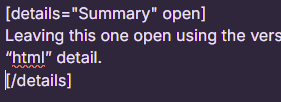
Not sure if anyone else is facing this but when people use the ‘hide details’ feature now, I’m finding that half the time, the details are already expanded and so its totally visible. It didn’t used to be this way but since the last big update, its been expanding on its own. I use this in mystery pattern tests so the other testers don’t get spoiled but if its happening to me, I’m afraid it might also be happening to them :( While I can easily click the button to hide, it clearly defeats the purpose if its already expanded.
This is happening to me both on my android samsung phone and my pc using firefox (I know firefox isn’t supported but just wanted to point out that its happening on multiple devices for me).
That’s strange cause I feel like I’ve submitted posts without closing and they’re hidden still, but I could be wrong. Though it should be written in that it should be hidden regardless of how it is when the post is submitted x.x
Well that’s silly. At least we know why but @ribblr is there any way for the techs to fix it so regardless of if the summary is collapsed or not, when the post is submitted, it will be hidden anyways? I feel like it totally defeats the purpose since most people will forget to collapse it when they write their post.
For now, I guess I’ll just have to ask people to make sure its collapsed in my mystery tests
But most with the new update that has the non-html version of the text box, you can’t see that it’s set to stay open. It shows the text but I figured it would hide itself once the post is submitted, not stay open the whole time.