
Hello everyone! I’m new to Ribblr and was wondering how do I upload my pictures of finished crochet makes in the journal page? Thank you!
6 Likes
If you’re talking about uploading multiple images, they all have the be separate journal entries 
when I upload multiple finished images, I make sure the last journal I submit has the final image I want for the “cover”, and that’s the entry I put any final thoughts or details about the pattern on as well.
Here is a link to a journal with two separate images! I just put “Img” or “image #” as the note for image only entries.
3 Likes
Ooh! Okay, but if I’ve never put anything in a journal before, what do I do?
Do I have to insert a link to the photo or something?
Sorry if I’m not making any sense! 
3 Likes
First open the pattern that you want to make a journal for. Then click on where it says “Journal” at the bottom of your screen

Then press “Upload photo”
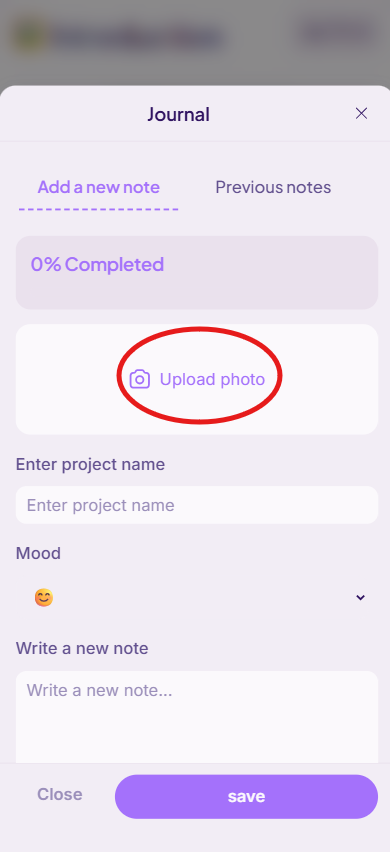
Now, you should be able to select one photo from your photo library and upload it.
Once the photo is uploaded, be sure to scroll down and add a project name, choose a mood, and include a note. Be sure to click “save” once you’re all done!

If this post answers your question, be sure to mark it as the “ solution”!
3 Likes
Thank you so much!
3 Likes
You’re welcome! :>
3 Likes