
Hello! How do you insert a testers only pattern for testers? I am new to this and I need testers. Help would be appreciated! Thanks!
I dont understand what ur saying. Sorry
Do you mean like posting a tester call so that people can apply to test your pattern?
Yes.
Sorry it doesn’t make sense.
To post a tester call, you will go to your shop. In the bottom right-hand corner of your pattern, there will be an icon that looks like a clipboard. Click on that, and it will bring up these options:
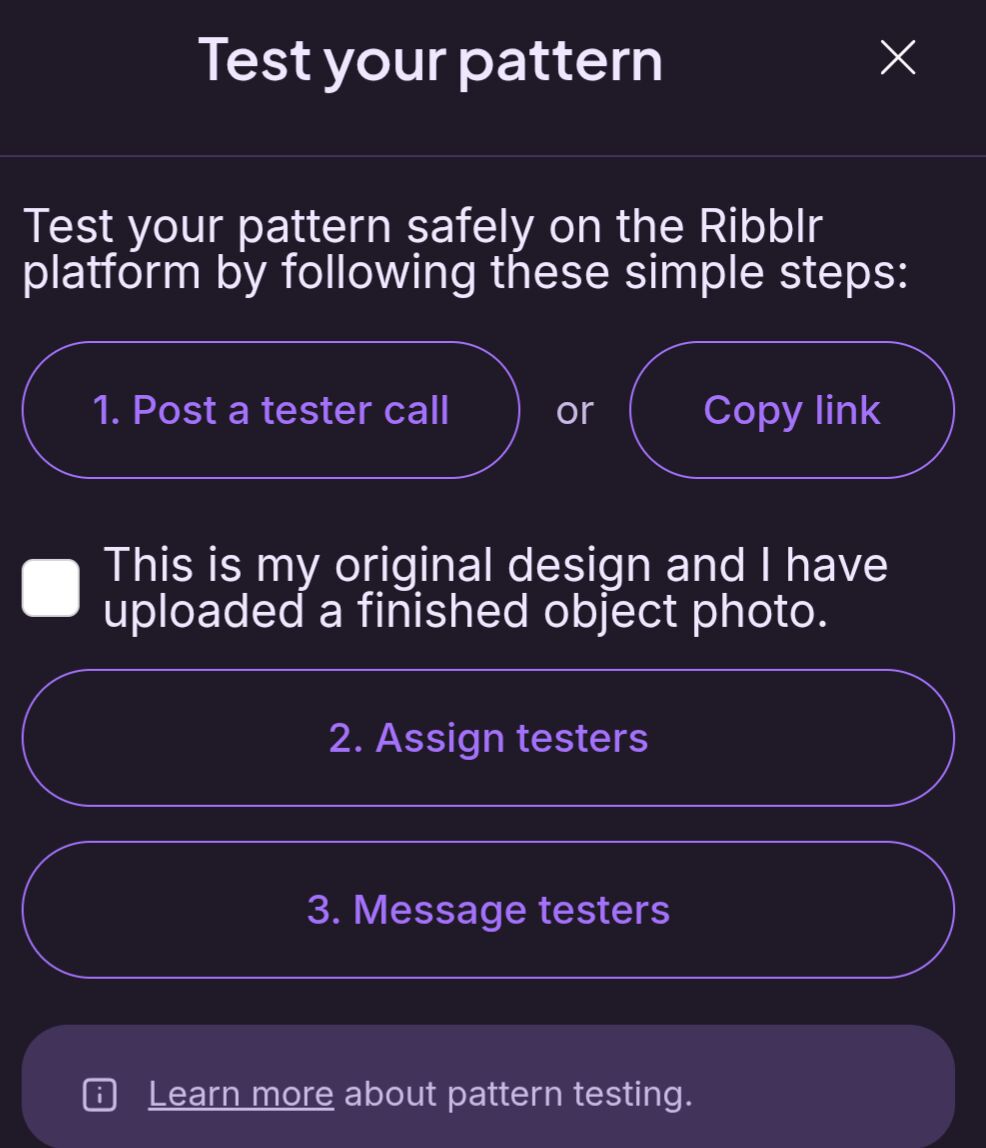
You will want to make sure to check mark the box, then click on the “Post a tester call” option. This will bring up a post that you can edit to include the due date, requirements, and details of your test. Then you can click the “Create Topic” button and other people will be able to see, comment, and apply to test using that post.
Once you have enough testers (you can see who’s applied by going to your “shop manager”, then “testing”, you will also be able to accept your testers so they can test your pattern there), you can close your tester call by editing the title of your post to include “closed” or asking the leaders to close it for you (you won’t be able to edit the title if it’s been posted longer than a day).
If you have any more questions, feel free to ask me!
Thank you!!!
@HarryPotterCrochets remember to mark the comment as solution! 